How to Configure SPF, DKIM, and DMARC in Replifier
By Replifier Team · ·Email
The business problem
An online stationery store had been sending biweekly campaigns to its subscribers for months. Open rates had always been solid, but then they started dropping by half. Customers replied saying they were getting the emails in spam, or not getting them at all.
The domain had no SPF, DKIM, or DMARC records set up. Receiving mail servers could not verify that those messages actually came from that store, so they treated them with suspicion. It was not a content problem or a frequency problem: it was an authentication problem.
How Replifier solves it
Replifier includes a built-in domain checker that reviews the status of eight authentication checks: SPF, DKIM, DMARC, and others (MX, BIMI, MTA-STS, TLS-RPT, alignment). Results are summarized in four states: healthy (everything in order), warning (something to improve), critical (a problem that may block sending), and unknown (the check could not complete).
Before any campaign goes out, Replifier verifies that the sender’s domain is authenticated. If it is not, the send is rejected with the error sender_domain_unverified.
Setting up the three records takes between 15 and 60 minutes, depending on how fast your DNS provider propagates changes.
Step by step
1. Add your domain in Replifier
Go to Settings → Sending Identities and add the domain you will send campaigns from — for example, marketing.mystore.com. Subdomains are valid: if mystore.com is verified, you can send from any of its subdomains.
2. Configure the SPF record
The SPF record is a TXT at the root of your domain. There must be exactly one; having two SPF records is a critical failure.
If you already have an SPF record, add your sending provider’s include: to the existing record instead of creating a new one. Examples: include:amazonses.com for Amazon SES, include:sendgrid.net for SendGrid, include:spf.mailjet.com for Mailjet, include:spf.protection.outlook.com for Microsoft Azure.
Always end your record with ~all (softfail), not +all. The +all modifier means any server can send from your domain and is a critical failure in the checker. RFC 7208 allows a maximum of 10 DNS lookups inside an SPF record; if your nested include: directives exceed that, the record fails.
3. Configure the DKIM record
DKIM requires a pair of TXT records named like selector._domainkey.yourdomain.com. The p= field holds the public key; if it is empty, the key has been revoked and the signature is invalid.
Generate the key pair from Replifier, copy the DNS record it shows you, and add it at your DNS provider.
4. Configure the DMARC record
The DMARC record is a TXT at _dmarc.yourdomain.com. The p= policy tells receiving servers what to do when a message does not pass SPF or DKIM:
p=none: the record exists but failing messages are not blocked at destination. Replifier marks this as a warning; it is a good starting point for reading reports, but it does not protect your domain.p=quarantineorp=reject: Replifier validates this as passing.
If you set pct= to a value under 100, the policy applies only to that percentage of messages. Replifier marks this as a warning.
5. Verify the status in Replifier
Once you have published the records in your DNS, use the domain checker in the dashboard to review the status. Propagation can take anywhere from a few minutes to 48 hours.
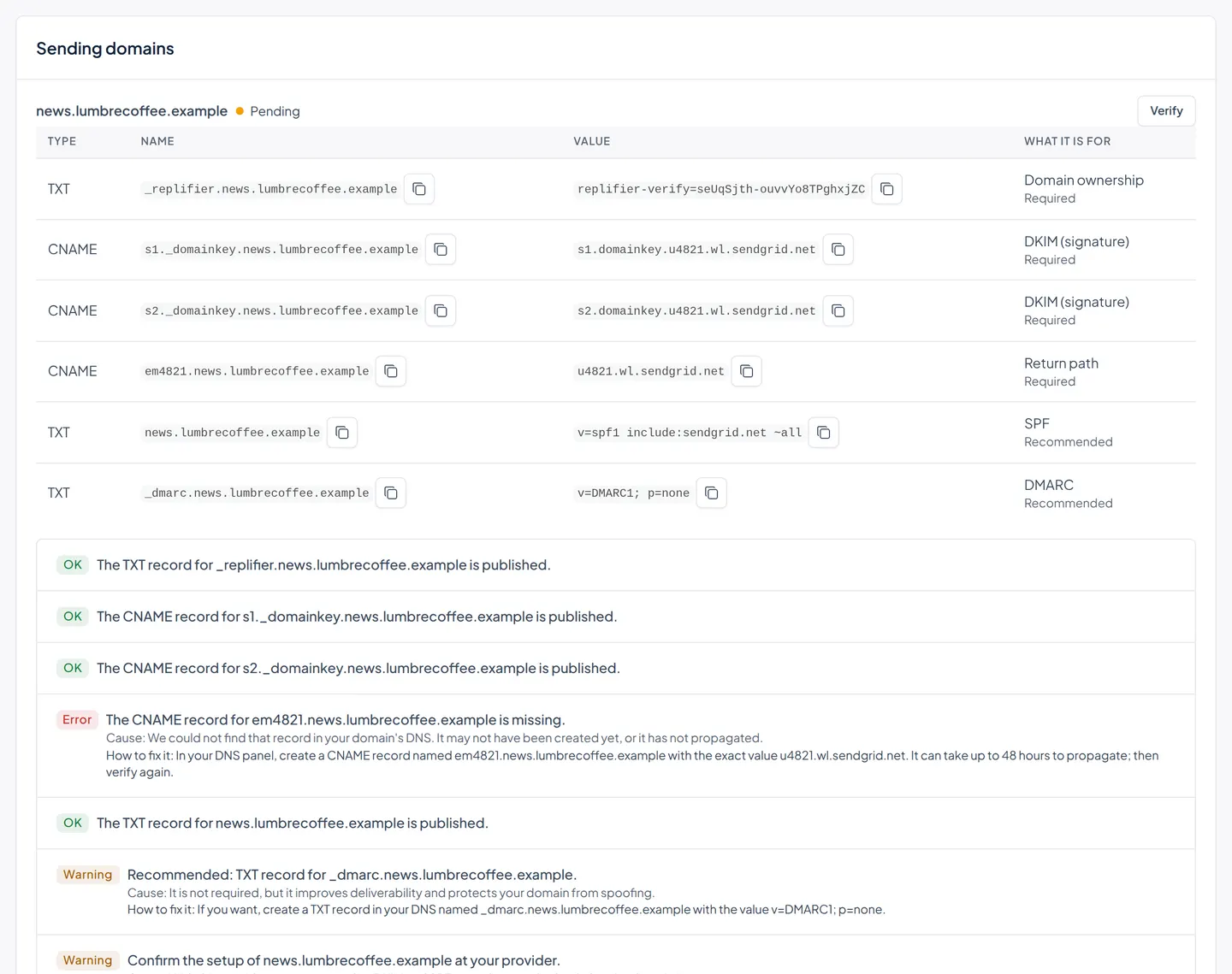
What you should see when done
The checker shows healthy status for your domain: SPF, DKIM, and DMARC all pass with no warnings. If any remains in warning, the dashboard points to the specific issue to fix.
Common errors
| Problem | Likely cause | Fix |
|---|---|---|
| SPF: multiple records | More than one v=spf1 TXT at the same domain |
Merge them into one |
| SPF: too many DNS lookups | You exceed 10 nested include: directives |
Simplify includes or use a direct IP |
SPF: open relay (+all) |
The record ends with +all |
Change to ~all |
| DKIM: revoked key | The p= value is empty |
Regenerate the key pair and update DNS |
DMARC: p=none warning |
Policy does not block anything | Move to p=quarantine once you have stable reports |